Table of Contents
Your Twitch username is more than a login—it’s your channel URL, chat identity, and the name viewers will repeat during raids and clips. A great streamer name is memorable, pronounceable, and brandable. This page offers a free interactive generator plus practical guidance on Twitch’s username rules, naming styles for different personas, and how to verify availability across platforms. Whether you’re a competitive shooter player, a cozy variety streamer, or a chaotic entertainer, you’ll find name ideas and the knowledge to choose one that endures.
User Intent and Brand Outcomes
A Twitch streamer name generator helps aspiring streamers find a handle that is easy to remember, easy to say, and easy to find. The key outcomes are memorability, pronounceability, discoverability, and long-term brand potential.
Memorability
A memorable name is short, distinctive, and often evokes a clear image. Pairing a concrete object with a wide-open second word gives viewers something to picture and leaves room to grow. For example, "Glitch Grove" or "Pixel Parlor" create a mental snapshot. Avoid generic terms that blend into the noise; a name like "Player123" is forgettable.
Pronounceability
Your name will be spoken aloud during intros, raids, and shoutouts. If it’s hard to pronounce, viewers may mumble or avoid saying it. Test it as an intro line: "Hey everyone, welcome to [your name]!" If it feels awkward, consider a simpler combination. Alliteration helps a name survive noisy chat and mumbled shoutouts—"Play Pulse" or "Speed Serpent" roll off the tongue better than random syllables.
Discoverability
Your username becomes your channel URL and chat name. Viewers type it in search, click your link in raid notifications, and see it on clips. A name that is easy to spell reduces friction. Avoid excessive numbers or unusual spellings that cause typos. Consistency across platforms—Twitch, YouTube, TikTok, Discord—makes you easier to find wherever your community hangs out.
Brand Potential
Your name should feel like a brand, not just a username. It should hint at your niche or personality, giving new viewers an instant read. Matching your content is helpful but not required; you can evolve your brand as you grow. A strong name leaves room for logos, emotes, and merchandise.
Platform Rules and Name Formatting
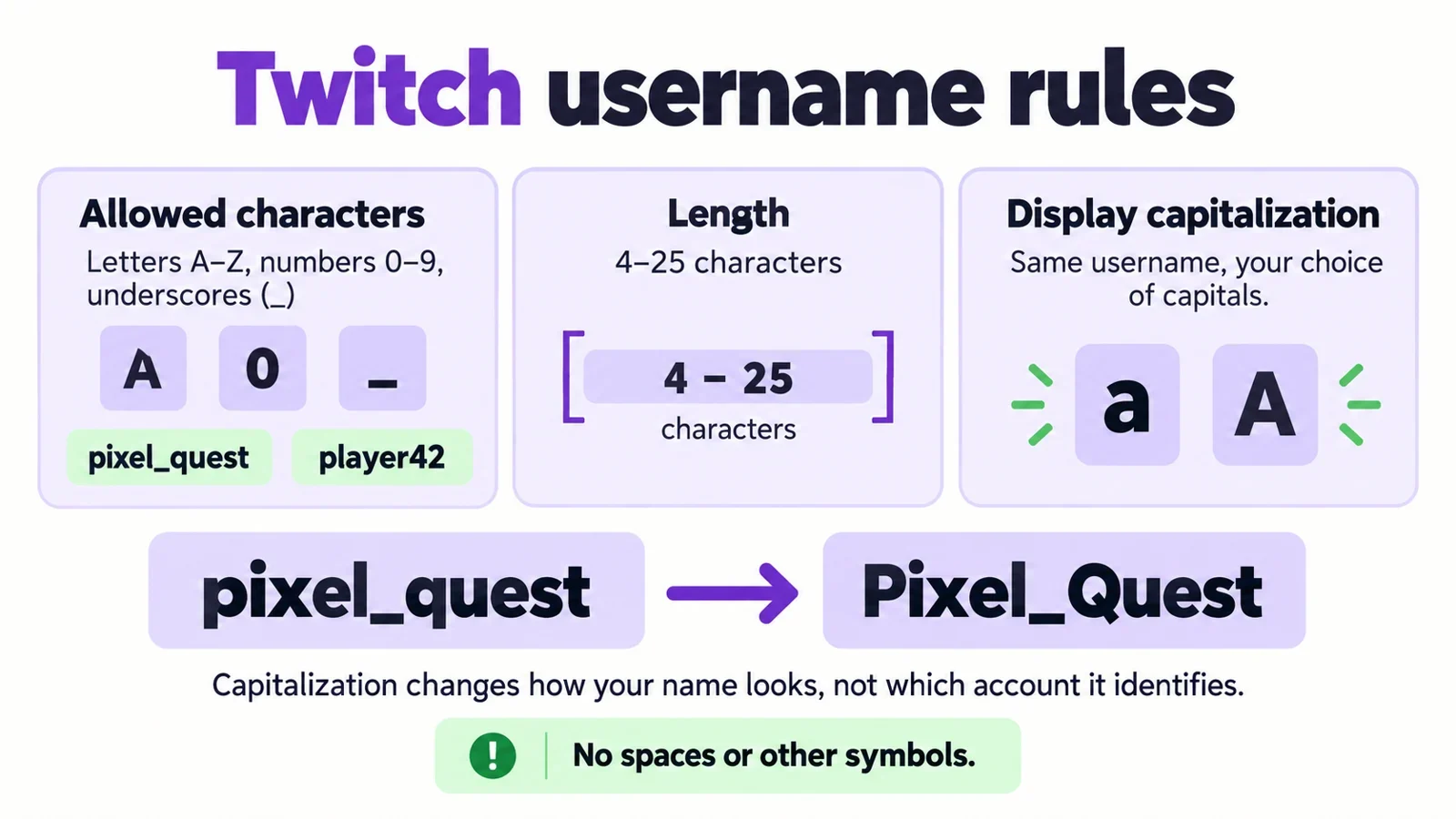
Before you fall in love with a generated name, understand Twitch’s username constraints. Twitch usernames use letters, numbers, and underscores within a length range of roughly 4 to 25 characters. Current rules are subject to change, so always confirm on the sign-up form or Twitch settings.
Allowed Characters
Only letters (a-z), numbers (0-9), and underscores (_) are permitted. Spaces, hyphens, periods, and special symbols are not allowed. This means your name will be a single string without spaces. Underscores can separate words, but they add length and can be hard to type; use them sparingly. For example, "CozyLantern" is easier to read than "cozy_lantern" and avoids an underscore that might be forgotten when someone types your URL.
Length Limits
Your username must be between 4 and 25 characters. Short names (4-10 characters) are snappy and easy to remember, but may be taken. Longer names (up to 25) allow more creativity but risk being hard to read at a glance. Aim for a balance: something short enough to fit comfortably in a small chat window, but descriptive enough to feel unique.
Display Capitalization
While usernames are case-insensitive for login and URL, Twitch supports display capitalization—the way your name appears in chat and on your profile. Capital letters improve readability. For instance, "CozyLantern" reads better than "cozylantern." Use camel case or capitalize the first letter to make your name instantly understandable. This also helps when viewers repeat your name aloud or type it from memory.
The Role of Underscores
Underscores are allowed but can be problematic. They add a character to type, and if a viewer sees your name in chat, they might not know whether to include the underscore. If you use an underscore, make it intentional—like separating two short words—rather than as a fallback. Some streamers use underscores to create a natural pause: "Pixel_Play" or "Tiny_Tempo." Test how it looks in chat and whether it feels natural to say.
Naming Styles by Streamer Persona
Different streamer personas benefit from different naming styles. Matching your name to your content or personality helps attract the right audience. The generator below offers niche tags—Competitive, Cozy, Chaotic, Variety—each with tailored word combinations.
Competitive Names
For ranked shooters, strategy games, or esports, sharp, aggressive names convey skill and intensity. Use energetic adjectives like "Blaze," "Swift," "Iron," or "Rapid" paired with strong nouns like "Wolf," "Falcon," "Bolt," or "Striker." Examples: "BlazeWolf," "SwiftFalcon." These names sound powerful and are easy to shout during clutch moments.
Cozy Names
For art, farming sims, chatting, or relaxing games, cozy names feel warm and inviting. Use soft, nurturing words: "Cozy," "Gentle," "Lil," "Sweet," or "Mellow" with nouns like "Lantern," "Cottage," "Sunrise," or "Breeze." Examples: "CozyLantern," "LilCottage." These names create a safe, welcoming atmosphere.
Chaotic Names
For variety streamers who embrace unpredictability, chaotic names are playful and energetic. Use words that suggest mayhem: "Chaotic," "Rogue," "Feral," "Turbo," or "Jester" with nouns like "Fox," "Panda," "Sprite," or "Waffle." Examples: "ChaoticFox," "TurboWaffle." These names signal that anything can happen.
Variety Names
Variety streamers need names that aren’t tied to one game. Broad, creative combinations work best: pair a digital or abstract word with a nature or common object. "Glitch Grove" and "Pixel Parlor" are examples. These names are flexible and can grow with your content.
Community-led Names
If you have a community in mind, consider names that hint at group identity, like "Guild," "Squad," or "Crew." "NightOwlCrew" or "Pixel Guild" suggest a collective. This can foster a sense of belonging from day one.
Use the niche tags in the generator to filter styles and see combinations that fit your persona.
Generator Logic and Result Quality
Our Twitch name generator uses a word-list and pattern-based system to produce two-part handles that are both creative and usable. It’s designed to avoid the common pitfalls of padded numbers and unpronounceable strings.
Pattern-Based Generation
The generator combines adjective-noun and optional-suffix patterns. With 20 adjectives, 20 nouns, and 6 suffixes, it yields a 2,400-selection space—plenty of variety without overwhelming randomness. You choose a niche tag (Competitive, Cozy, Chaotic, Variety) to filter the adjective and noun pools, ensuring the results match the tone you’re aiming for.
Two-Part Structure
Blending an energetic adjective with a strong noun beats a single dictionary word. For example, "Swift" + "Falcon" = "SwiftFalcon." This structure is easy to remember and often available because it’s less common than a single word. It also avoids the need for padded numbers, which make a handle hard to say aloud. "SwiftFalcon" is more memorable than "SwiftFalcon2024."
Pronounceability and Chat-Readability
Every generated name is reviewed for pronounceability. If you can’t say it in one breath, it’s not ideal. Also, names should be short enough to read at a glance in a small chat window. Aim for 10-15 characters when possible. The generator avoids excessive underscores or digits that break readability.
Uniqueness Limits
No generator can guarantee a name is unique on Twitch. Names are generated based on word combinations, not live database queries. You may see duplicates if you generate many names. Use the copy and favorite features to save your top picks, then check availability manually.
Availability, Legal, and Cross-Platform Checks
Generators create name ideas, but they cannot verify real-world availability, trademark safety, or social media handle consistency. You must perform manual checks before committing.
Twitch Availability
To check if a Twitch username is taken, go to twitch.tv and attempt to create a new account with that name, or use the "Change Username" feature in settings (if you have an account). If the name is taken, you’ll see an error. Note that names are case-insensitive, so "CozyLantern" and "cozylantern" are the same.
Trademark and Legal Checks
Your name should not infringe on existing trademarks. Use the USPTO trademark database (for US) or your local trademark office to search for similar names, especially if you plan to monetize your brand. Also search social media and the web for any existing entities using the same name. Avoid names that could be confused with established brands, especially in gaming or entertainment.
Cross-Platform Consistency
It’s wise to claim the same name on YouTube, TikTok, and Discord so viewers can find you across platforms. Before settling, check if the handle is available on those sites. Use a username checker tool to see availability, but always confirm directly on each platform. If a name is taken on one platform, you might need to adjust.
The TTV Suffix
Some streamers add "TTV" to their name on other platforms to indicate they stream on Twitch. However, "TTV" is redundant on Twitch itself. It also adds characters that can make the name longer and harder to read. Reserve TTV for social handles if needed, but keep your Twitch username clean.
Interactive Widget Requirements
Below you’ll find the interactive Twitch Streamer Name Generator. It’s free, requires no sign-up, and runs entirely in your browser. Use the niche tags to filter naming styles, choose how many names you want, and click generate to see instant results. Each card includes a Copy button to save the name to your clipboard and a Favorite button to store it locally in your browser.
How to Use the Generator
- Select a niche tag: Competitive, Cozy, Chaotic, or Variety.
- Choose a count: 5, 10, or 20 names.
- Click "Generate Twitch Names" to create a set.
- Review each result, copy your favorites, and star them for later.
- Your favorites are saved in your browser’s localStorage, so you can close the page and come back.
Saving and Copying
Use the Copy button to quickly paste a name into Twitch’s sign-up form. Use the Favorite (star) button to add a name to your personal shortlist. Favorites are stored locally on your device—no account needed, and your data stays private.
A Note on Availability
This generator provides creative suggestions only. It does not check whether a name is available on Twitch or any other platform. Always verify manually before you commit.
SEO Content and FAQ Targets
To help you make the best decision, we’ve answered common questions about Twitch usernames below. These FAQs are also formatted for schema markup to help search engines understand this page.
Frequently Asked Questions
What makes a Twitch streamer name memorable and pronounceable?
A memorable name is short, distinctive, and often uses two words that create a clear image. Pronounceability means you can say it aloud without stumbling. Test it by saying "Welcome to [name]" aloud, and share it with friends to see if they can spell it after hearing it once.
What characters and length limits apply to Twitch usernames?
Twitch usernames use letters, numbers, and underscores, with a length of roughly 4 to 25 characters. No spaces, hyphens, or special symbols. Check the sign-up form for current rules.
How can streamers check whether a Twitch name is available?
Try to create an account with that name on Twitch, or use the "Change Username" feature if you have an account. If it’s taken, you’ll get an error. You can also try logging in with the name temporarily, but that may not work if the account is inactive.
Should a Twitch streamer name match the games or content niche?
It’s helpful but not required. Matching your niche gives viewers an instant read on your content. However, if you plan to stream a variety of games, a broader name allows flexibility. Choose a name that represents your personality and can grow with you.
Can streamers change their Twitch username later, and what may break?
Yes, you can change your username, but there may be a cooldown between changes. Changing your name might break links on external sites that use your old URL, and clips or highlights could be affected. It’s best to choose a name you’re happy with for the long term.
How should display capitalization and underscores be used in Twitch names?
Use capital letters to improve readability, like "CozyLantern." Avoid underscores unless they add clarity, as they can be forgotten when users type your URL. If you use an underscore, test whether it feels natural when spoken.
What legal and trademark checks are needed before using a generated name?
Search for existing trademarks using the USPTO database or your local trademark office, and check social media and the web for existing entities. This is especially important if you plan to monetize your brand.
How can streamers test a name for spoken and chat readability?
Say it aloud in an intro sentence, and share it with a friend to see if they can spell it correctly. Consider how it appears in a small chat window: is it short enough to read at a glance? Avoid lengthy strings that might get cut off.